 LidGlow
01 / YOUR RHYTHM
Let the music lead.
Your logo responds to the sound playing on your Mac. Tune the intensity to suit your listening. System audio is processed locally, never recorded or uploaded. No microphone needed.

Give your new MacBook Pro with PROLED XDR display a glow of its own. Glow with your music. See when Codex needs you. Or set your own rhythm.
Get LidGlow FreeCompare Free & ProOne download. Start Free and unlock Pro anytime.
Find this icon in your Mac’s menu bar →Free downloads are coming soon.
Free essentials for the new MacBook Pro with PROLED XDR display. A native menu-bar app for macOS Golden Gate 27.
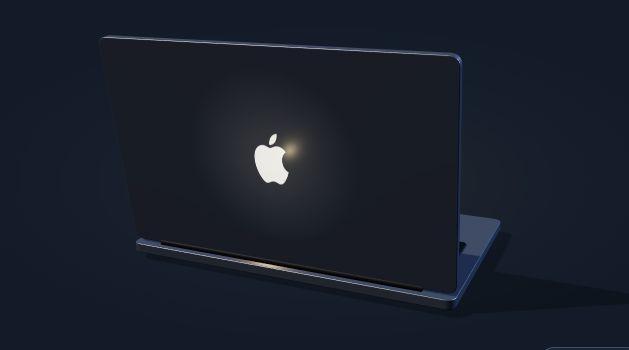 Drag to rotate · Concept illustration
Try it here. See the light respond.
Loading the interactive preview…
Illustrated preview only. Music and Codex signals are simulated.
After opening LidGlow, look for the small laptop icon at the top-right of your screen, near the clock. Click it for on/off, brightness, and your favorite glow.
See the step-by-step setup guide →From your favorite track to your next idea, give the light a reason to move.
Your logo responds to the sound playing on your Mac. Tune the intensity to suit your listening. System audio is processed locally, never recorded or uploaded. No microphone needed.
A soft glow while idle. A pulse while working. Two blinks when approval is needed, and three when work finishes. Connect supported local Codex sessions once in Settings.
Dim at night, pulse during focus time, or turn the logo off for a particular app. Create rules for a daily time range or the app you’re using. Manual changes take priority for an hour.
Keep a steady glow or choose a breathing cycle from 2 to 16 seconds. Adjust the brightness, or switch it off. Your preferences are remembered.
Free and Pro use the same LidGlow download. Install once, then enter your Pro activation code in Settings → License & Pro to unlock the extra features. No separate Pro download or reinstall needed.
No trial. No expiration. No activation code needed.
Unlock extra features in the same app with your Pro activation code. One license covers one Mac.
Loading current prices…
One-time Pro keeps working with the purchased version. Future releases are not included unless expressly offered.Quick controls, with effects that pause when your Mac sleeps or locks. Low Power Mode pauses effects by default.
Requires macOS Golden Gate 27 and a MacBook Pro with PROLED XDR display. Brightness scales Apple’s automatic level; your screen brightness and ambient light still affect the result. Music mode requires permission to capture system audio. Codex mode uses local hooks you review and trust; cloud-only jobs aren’t supported.
LidGlow is part of the KRISHDTECH app family.
 Also from our studio: Edgewide ↗